Player inventory #
The inventory is a part of player’s data. Each inventory item has a name and the associated item count and can be rendered in HUD as a sprite.
Currently the inventory items don’t affect the gameplay on their own (except for special items). It’s just a tool for the level designer to introduce the custom player resource. Such examples include security cards and other quest items which usefullness is fully defined by the mapper.
To define and use an inventory item, do the following:
- Define the item in the templates/inventory.json (optional).
- Define HUD-related properties for the item in sprites/hud_inventory.json (optional).
- Add sprite entry to the sprites/hud.txt (optional) (don’t forget to increase the number at the start of the file!).
- Use player_inventory or item_pickup to give the item to player in game.
- Use player_hasinventory as a master to lock door/button/trigger until the player obtains the item.
- Use player_inventory to remove the item from player once it’s not needed anymore.
The current system is designed with only singleplayer in mind. There’s no way for a player to drop an item, there’s no way to check if the player who carries the item has left the game (disconnected), etc.
Defining inventory items #
Inventory items are defined in the templates/inventory.json.
Example:
{
    "items": {
        "longjump": {
            "max_count": 1
        },
        "battery_blue": {
            "max_count": 5,
            "pickup_template": {
                "own_visual": {
                    "model": "models/w_battery.mdl",
                    "renderfx": "Glow Shell",
                    "color": [0, 0, 255]
                },
                "soundscripts": {
                    "Inventory.Pickup": {
                        "waves": ["items/gunpickup4.wav"]
                    }
                }
            }
        },
        "battery_red": {
            "max_count": 5,
            "pickup_template": {
                "own_visual": {
                    "model": "models/w_battery.mdl",
                    "renderfx": "Glow Shell",
                    "color": [255, 0, 0]
                },
                "soundscripts": {
                    "Inventory.Pickup": {
                        "waves": ["items/gunpickup4.wav"]
                    }
                }
            }
        },
        "security_card": {
            "max_count": 4,
            "pickup_template": {
                "own_visual": {
                    "model": "models/w_security.mdl"
                },
                "soundscripts": {
                    "Inventory.Pickup": {
                        "waves": ["items/cardkey_pickup.wav"]
                    }
                }
            }
        }
    },
    "special_items": {
        "item_antidote": {
            "max_count": 3
        },
        "item_radiation": {
            "max_count": 2
        },
        "item_adrenaline": {
            "max_count": 1
        }
    }
}
This example defines 4 inventory items.
The document can have the following properties:
items #
A dictionary of inventory item game-logic definitions.
- The
max_countproprerty defines how many duplicates of the item player normally is allowed to obtain. By default the max count is unlimited. It’s not required to define the inventory item in the templates/inventory.json but it’s the only way to set the max count limit per item. - The
pickup_templateproprerty allows to define the Entity template that will be used by item_pickup with a specifiedInventory itemtype. It’s useful if you want to ensure a uniform look and pickup sound for all items of the same type. This also allows to change the look and sound without editing maps in the mod.
In the example above inventory items battery_blue and battery_red are set to have the models/w_battery.mdl model and specific render effect, so mapper doesn’t need to specify the model and the render effect for each item_pickup when they want to place these items on the map.
Currently the maximum number of different inventory items player can carry at the same time is 16.
special_items #
Game-logic definitions for special items.
This supports a restricted list of items. Each definition can have the following properties:
max_count- how many items of such type the player can carry.
HUD #
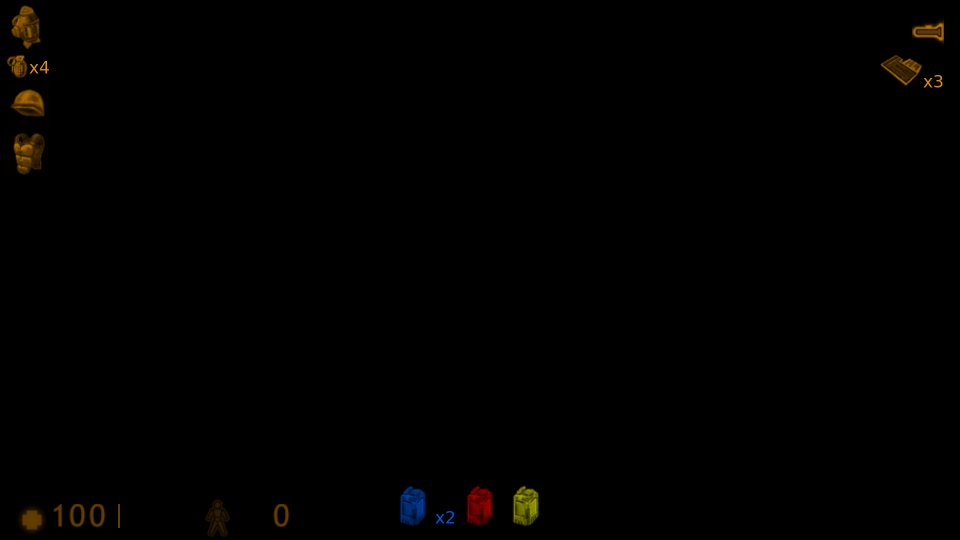
The way the inventory items are shown in HUD is defined in the sprites/hud_inventory.json. This allows to set the associated HUD sprite, its color and (to some extent) its position on the screen.
Example:
{
    "sprite_alpha": 225,
    "text_alpha": 200,
    "items": {
        "battery_blue": {
            "sprite": "item_battery",
            "position": "bottom",
            "color": [0, 100, 255]
        },
        "battery_red": {
            "sprite": "item_battery",
            "position": "bottom",
            "color": [255, 0, 0]
        },
        "longjump": {
            "sprite": "item_longjump",
            "position": "topleft",
            "show_in_history": false
        },
        "security_card": {
            "sprite": "item_security",
            "position": "topright"
        }
    },
    "special_items": {
        "item_antidote": {
            "sprite": "dmg_bio",
            "position": "topright",
            "color": [0, 255, 255]
        },
        "item_radiation": {
            "position": "topright",
            "color": [255, 255, 0]
        },
        "item_adrenaline": {
            "position": "topright",
            "color": [255, 0, 0]
        }
    }
}
The
security_cardin the example above refers to theitem_securitysprite entry that doesn’t exist in sprites/hud.txt by default (neither in base Half-Life nor in the sample mod). This is just an example. You’ll need to add such definition by yourself.The keycard sprite used in the example picture is taken from the ETC2 mod.
The document can have the following properties:
sprite_alpha #
An alpha value for sprites. Default value is 175.
This also can go by the
"default_sprite_alpha"name
text_alpha #
An alpha value for text (used to show the count of items). Default value is 225.
items #
A dictionary of inventory item HUD definitions. Each entry in the "items" dictionary is an object that can have the following properties:
"sprite"property should refer to the name from the sprites/hud.txt."color"defines sprite color in HUD. When omitted it will use the client’s main HUD color."alpha"- custom alpha value for this item. This will override the top-level"sprite_alpha"."position"defines the item icon position in the HUD and can be one of the following values:"topleft"- the default position. The item icon will be displayed on the top-left corner of the screen."topright"- the item icon will be displayed on the right side under the flashlight (or under the move mode if it’s enabled)."bottom"- the item icon will be displayed on the bottom center (not recommended if your mod features the controllable trains as the train control sprite will be intermingle with the item icons)."hide"- don’t show the item on the main HUD (but still show in the journal if it has the inventory section).
"show_in_history"allows to configure whether the icon should appear in the pickup history (along with picked up items, ammo and weapons). This istrueby default."show_in_journal"- whether to show the item in the journal inventory section. This istrueby default."show_count_when_one"- whether to show the item count next to the icon when player has only one item of this type. This isfalseby default.
If the map utilizes some inventory item that is not defined in the sprites/hud_inventory.json the game will try to find a HUD sprite by the item name and show it with default parameters (e.g. the item named
item_helmetwill useitem_helmetas a HUD sprite and will render with a player’s HUD color).
If the player has several duplicates of the same item it will be shown as a number next to the item icon.
special_items #
HUD definitions for special items.
This supports a restricted list of items. The items can have the same properties as ones in "items" dictionary, but the following properties will be ignored:
"show_in_history"- special items are always shown in history."show_in_journal"- special items are never shown in journal."show_count_when_one"- special items always show their count.
Controlling the player’s inventory #
The player_inventory allows to add or remove inventory items for the player.
The item_pickup allows to put an item in the world. Such item can be picked up by a player like others (e.g. item_battery) and it will give the inventory item and disappear.
The player_hasinventory allows to check if the player has at least one item of the specified type.
The player_calc_ratio with type Inventory item count allows to track the number of item duplicates the player carries (and use it in trigger_compare).
Special items #
Special items are shown in HUD along with inventory items, but are handled differently (they can’t be manipulated via player_inventory or checked via player_hasinventory). Special items include:
In HUD special items are always shown before the inventory items.
Developer commands #
When sv_cheats is enabled you can use following commands to get or remove inventory items.
give_inventory #
Syntax: give_inventory <item_name> <number of items> where
<item_name>is the name of the inventory item to give.<number of items>is a number of duplicates to give. When omitted it gives 1 item by default.
Example: give_inventory battery_red 3
If the max count limit is imposed on the inventory item, the command won’t give more items than that.
remove_inventory #
Syntax: remove_inventory <item_name> <number of items> where
<item_name>is the name of the inventory item to remove.<number of items>is a number of items to remove. When omitted it removes 1 item by default.
Example: remove_inventory battery_red 2
FAQ #
Q: Why there’re two files describing the inventory items?
A: The templates/inventory.json is read server-side and includes game logic parameters. The sprites/hud_inventory.json is read client-side and defines only how the inventory item is rendered in the client’s HUD. If you were making a multiplayer mod the user could configure what the inventory would look like in their HUD.
Q: Why is the entity for inventory item placed in the world called item_pickup rather than item_inventory?
A: This is to avoid confusion with item_inventory from Sven Co-op.